Most people use Midnight Commander with the default blue color scheme which is hard for me to understand because I think it’s terrible and I’ve always preferred it with black colors.
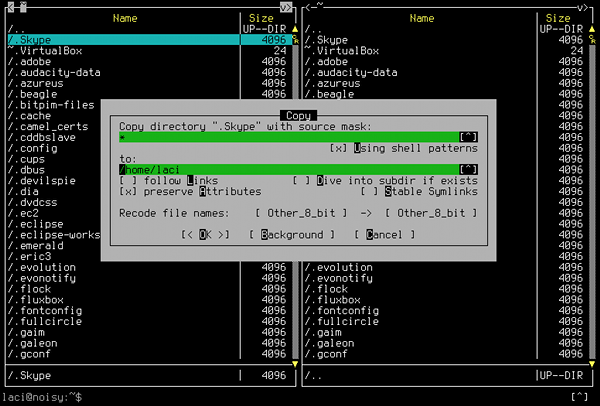
Here’s what you need to include into mc.ini:
[Colors]
base_color=linux:
normal=white,black:
marked=yellow,black:
input=,green:
menu=black:
menusel=white:
menuhot=red,:
menuhotsel=black,red:
dfocus=white,black:
dhotnormal=white,black:
dhotfocus=white,black:
executable=,black:
directory=white,black:
link=white,black:
device=white,black:
special=white,black:
core=,black:
stalelink=red,black:
editnormal=white,black
Do not put newlines between the color definitions! Write them as a single line! I only did it for readability.
Update: Starting from Ubuntu 10.4 Lucid Lynx you’re advised to skip the menu and menusel definitions because the those will mess up menu colors.
Hi Laci!
thanx the colorscheme! I reinstall my Gentoo and I can use it your colorscheme. So, thanks your grat job! :)
Bundi ;)
Hey Bundi!
I’m happy to see that you like it :)
Have a great day and take care!